
Features
What can LCMS do?
Projects, records, people and equipment. Explore the workflows below, including the limits and setup each one needs.
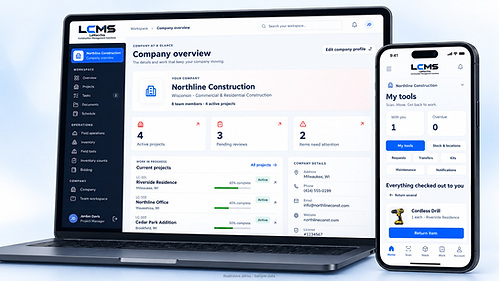
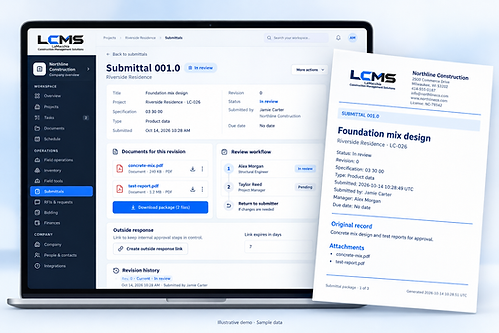
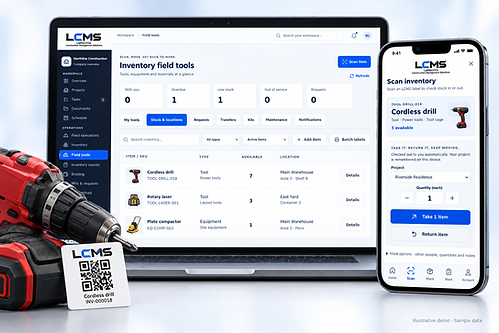
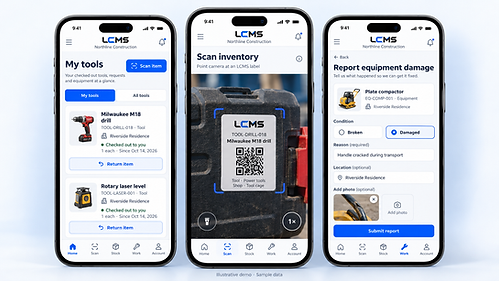
Screenshots are of the LCMS application using a sample company workspace.
Projects & documents
Projects & coordination
Know what's happening on every job without chasing anyone for an update.
- Company and project dashboards
- Project statuses, including bidding
- Team assignments per project
- Milestones with target dates
- Tasks with priorities and deadlines
- Activity updates on the records that change
Documents
One place for project and company files, with the history behind every version.
- Project files and company files
- Original downloads kept intact
- Version history
- Search across stored documents
- Access permissions on files
- Supporting photos attached to records
Submittals
Track what was sent, what came back, and who owes the next step.
- Numbered submittal records
- Revisions
- Specification sections
- Multiple attachments per record
- Review responsibility
- Approval responses
- Returned documents
- Full review history

RFIs & outside collaboration
Keep the original question intact, and bring subs and reviewers in for exactly what they need.
- Original questions with their supporting documents
- Separate responses with their own attachments
- Assignment tracking
- Protected originals that responders cannot edit
- Expiring response links for outside reviewers
- Links for selected subcontractors and bidders
- Access limited to the records they are assigned
Branded PDF packages
Send out documents that look like your company, not a printout.
- Your company logo and information on cover sheets
- Record details and responses
- Attachment indexes
- Compiled supporting PDFs and images
- Other supported attachments included as embedded originals
Only file types LCMS supports are embedded as originals — other formats are not automatically converted.
Field & bidding
Field operations
Capture what happened on site while it's still fresh, not from memory on Friday.
- Daily logs with weather and crew information
- Photos and supporting documents
- Punch items
- Inspections
- Safety records
- Issues with assigned follow-up work
Bidding
Run bid packages and compare quotes against the same scope.
- Bid packages
- Scope and due dates
- Bidder tracking
- Outside proposal submissions
- Quote comparisons
- Exclusions
- Supporting documents
- Recorded awards
Recording an award does not automatically issue a contract.
Time & financial tracking
See hours and costs against the job while there is still time to react.
- Project and task time entries
- Manager approvals on time
- CSV exports
- Budgets and expenses
- Change orders
- Estimate, purchase order and invoice registers
LCMS does not provide full accounting, payroll or tax processing.
Inventory & equipment
Inventory management
Know what you own, where it is, and how much is left.
- Automatically generated SKUs
- Custom SKUs where you need your own numbering
- Item photos
- Individual assets
- Serial information
- Storage locations
- Quantities on hand
- Stock movement history

QR inventory workflows
Scan a label instead of writing something down twice.
- Printable QR labels
- Mobile scanning
- Quick equipment checkouts and returns
- Material usage recorded against the job
- Instant item lookup

Inventory counts
Count once, review the variance, and adjust with a manager's approval.
- Assigned counts
- Scanned observations
- Variance review
- Manager-approved adjustments
- Recounts when stock changes during a count
Equipment maintenance & alerts
Get broken equipment off the floor and into the shop.
- Employee reports of broken or damaged equipment
- Required reason on every report
- Optional time and location
- Service logs
- Maintenance and inspection tracking
- Equipment holds while an item is out of service
- In-app notifications to managers and owners
- Email alerts when email delivery is configured
Field inventory tools
Crews get what they need, and you can still see where it went.
- Personal and crew checkouts
- Transfers between locations
- Kits
- Equipment requests
- Reservations
Business & administration
People & company branding
Keep your team, your contacts and your company look in one place.
- Employee invitations
- Roles
- Project responsibilities
- Clients
- Vendors
- Subcontractor contacts
- Company profile, logo and color theme
Administration & shared access
Control who can see and change what — and keep a record of it.
- Role and project permissions
- Activity history
- Controlled record deletion
- Owner-controlled operational data reset that preserves company identity and accounts
- Runs in the browser against the central LCMS service
- The iPhone inventory companion connects to that same service
Integrations
Connect LCMS to tools you already run — once you're ready to set them up.
- Sage 100 connection tools
- Buffer
- Make
Integrations require configuration and the appropriate third-party accounts. The Sage 100 connection needs connector setup and validation against your installed version.
LCMS 0.17.0 · LCMS Pro
Native accounting connections
- QuickBooks Online
- Owner-authorized connection with manual customer/job, vendor, chart-of-accounts, invoice and bill snapshots. Supports reviewed contact imports into LCMS, project mappings and accountant CSV exports.
- Xero
- Owner-authorized organization selection with manual customer, supplier, account, invoice and bill snapshots. Supports reviewed contact imports into LCMS and project mappings.
Accounting records are read as manual snapshots. Contact imports require an explicit review and import into LCMS. Accountant CSV files are normalized LCMS exports for an accountant to review and map to their software, not universal one-click compatibility.
This release does not create invoices or bills in either provider, process payroll or bank payments, automatically reconcile books, schedule a background accounting sync, or support QuickBooks Desktop.
An operator must configure the provider app first. A company owner then signs in with their LCMS account and opens Integrations → Accounting connections. Authorization starts and finishes inside that LCMS browser session, not on this website.
Publishing these descriptions does not mean a provider is configured or connected. LCMS controls availability and existing beta or legacy grants. Native accounting is a Pro feature; Lite excludes the iPhone companion and all AI. This update does not open enrollment, checkout or payments.
Do not send provider secrets, tokens, accounting or LCMS passwords, or exported company financial data to this marketing website.
See it against your own jobs
LCMS Lite is free while we finish it. Request access and we'll set up your company workspace.