
iPhone app
The LCMS iPhone app
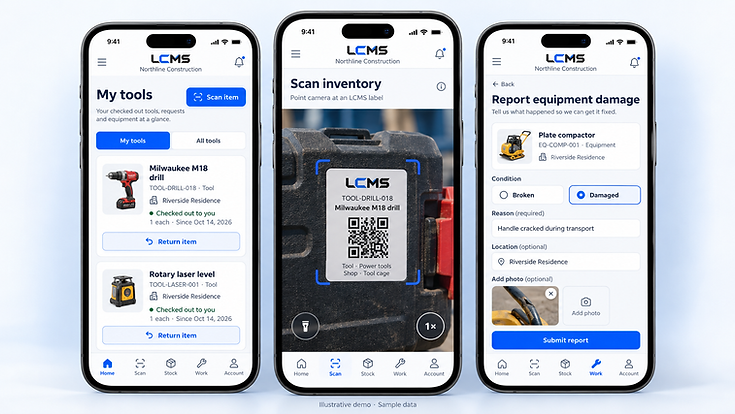
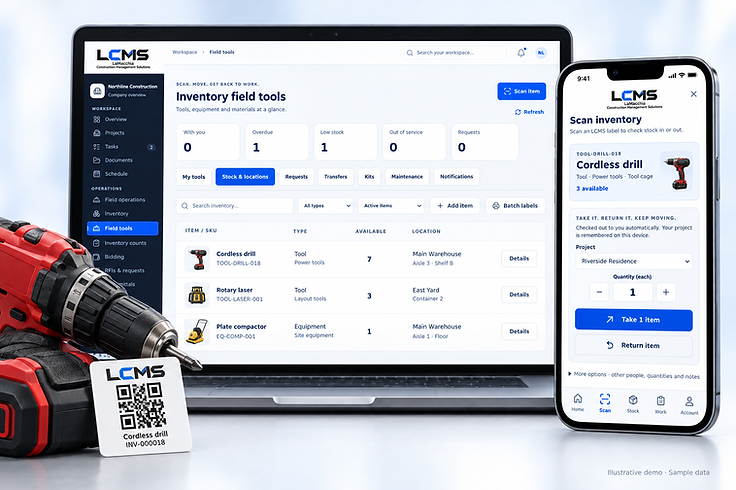
Scan labels, take tools out and report damage from the field, straight into the same company workspace your office already uses. The app is in closed beta, and access is granted by the development team only.
Access is by permission only
The iPhone app is a closed beta. It is not published on the App Store, and there is no public download. It is only made available with explicit permission from the LCMS development team, granted company by company.
If your company would like to take part, ask us and we will follow up with what is currently open.
Ask about the betaIn the field
The parts of the job you do standing up
The iPhone app is built for the yard, the shop and the site — the same records, from the device already in your pocket.
Scan LCMS QR labels
Point the phone at a label on a tool, a kit or an installed-equipment tag and LCMS finds the record. No typing an SKU from memory.
Take and return equipment
Check items out to yourself or a crew, transfer between locations, and record material used against the job — straight from the yard or the site.
Count and verify stock
Work through an assigned count, scan what you see, and let a manager review the variance before anything is adjusted.
Report damaged equipment
Flag a broken or damaged item with a reason so it can be pulled off the floor and into the shop.

Availability
One app, across LCMS editions
The iPhone app works against your company's LCMS workspace and its capabilities follow the access your company has.
Built for the field
Scanning, checkouts, counts and damage reports all work against the same company workspace your office uses — the same inventory records, permissions and history.
The same app everywhere
There is one LCMS iPhone app, not a separate one per edition. What it can do follows your company's access, so there is nothing extra to install later.
Closed beta enquiries
Want your crew on the beta?
Tell us about your company and how your team works in the field. The development team reviews every request.